Tag

Bitlocker

All articles tagged with #bitlocker

Microsoft Enhances BitLocker Performance with Hardware Acceleration

Originally Published 19 days ago — by TechPowerUp

Featured image for Microsoft Enhances BitLocker Performance with Hardware Acceleration
Source: TechPowerUp

Microsoft has introduced hardware-accelerated BitLocker encryption in Windows 11, significantly improving storage performance and reducing CPU usage by offloading cryptographic operations to dedicated hardware, especially benefiting random I/O operations and modern multitasking workloads.

Microsoft Enhances Windows Storage Speed with Hardware-Accelerated BitLocker

Originally Published 19 days ago — by Windows Latest

Featured image for Microsoft Enhances Windows Storage Speed with Hardware-Accelerated BitLocker
Source: Windows Latest

Microsoft acknowledges that enabling BitLocker on Windows 11 PCs with NVMe SSDs can cause a performance slowdown, especially during resource-intensive tasks like gaming and video editing, due to increased CPU usage for encryption. However, hardware-accelerated BitLocker, supported by upcoming CPUs and SoCs, offloads encryption tasks to dedicated hardware, significantly reducing CPU load and improving performance and battery life. Users can verify support via command line, and future updates will enable automatic use of hardware acceleration on compatible devices.

Microsoft's October Windows Update Causes BitLocker Recovery Issues

Originally Published 2 months ago — by Forbes

Featured image for Microsoft's October Windows Update Causes BitLocker Recovery Issues
Source: Forbes

Microsoft has confirmed a problematic Windows update released in October 2025 that can trigger the BitLocker recovery screen, risking data loss for users who do not have their recovery keys, especially affecting enterprise Windows 11 and Windows 10 users. A fix is available but requires manual intervention by IT teams.

"ShrinkLocker Ransomware Exploits BitLocker to Encrypt Files"

Originally Published 1 year ago — by TechRadar

Featured image for "ShrinkLocker Ransomware Exploits BitLocker to Encrypt Files"
Source: TechRadar

A new ransomware strain called ShrinkLocker is exploiting Windows BitLocker to encrypt and steal files, primarily targeting government agencies and firms in manufacturing and pharmaceuticals. Unlike typical ransomware, ShrinkLocker does not drop a ransom note but instead uses email addresses as new boot partition labels for communication. It also deletes all BitLocker protectors, making recovery impossible without the attackers' key. The ransomware has affected organizations in Mexico, Indonesia, and Jordan.

"ShrinkLocker Ransomware Exploits BitLocker to Encrypt Data"

Originally Published 1 year ago — by Ars Technica

Featured image for "ShrinkLocker Ransomware Exploits BitLocker to Encrypt Data"
Source: Ars Technica

A new ransomware called ShrinkLocker uses Windows' BitLocker feature to encrypt victim data, targeting systems in Mexico, Indonesia, and Jordan. Discovered by Kaspersky, ShrinkLocker shrinks non-boot partitions and creates new primary partitions, then disables BitLocker protections and generates a complex encryption key. Kaspersky advises robust endpoint protection, minimal user privileges, and frequent offline backups to mitigate risks.

ShrinkLocker Ransomware Exploits Microsoft BitLocker for File Encryption

Originally Published 1 year ago — by BleepingComputer

Featured image for ShrinkLocker Ransomware Exploits Microsoft BitLocker for File Encryption
Source: BleepingComputer

A new ransomware strain called ShrinkLocker uses Windows BitLocker to encrypt files by creating new boot partitions, targeting government entities and companies in the vaccine and manufacturing sectors. Written in VBScript, ShrinkLocker detects specific Windows versions and modifies registry entries to disable remote desktop connections and enable BitLocker encryption without a TPM. The malware deletes BitLocker protectors to prevent recovery and uses TryCloudflare to deliver encryption keys. Kaspersky advises secure storage of recovery keys and regular offline backups to mitigate such attacks.

"Raspberry Pi Pico: Breaking BitLocker Encryption in Seconds"

Originally Published 1 year ago — by Ars Technica

Featured image for "Raspberry Pi Pico: Breaking BitLocker Encryption in Seconds"
Source: Ars Technica

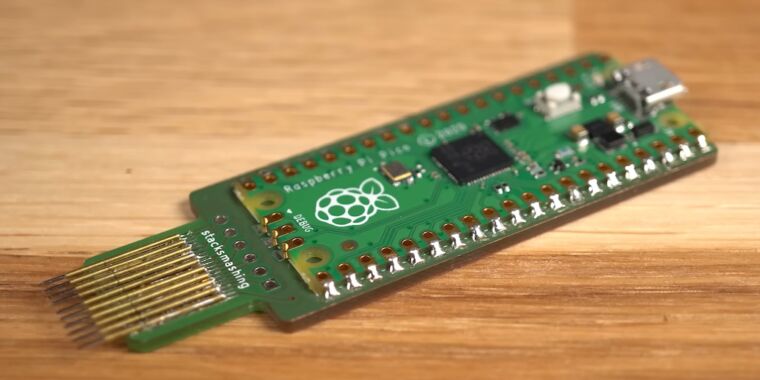
A security researcher demonstrated an exploit using a Raspberry Pi Pico and a custom PCB to break Microsoft's BitLocker drive encryption by sniffing the encryption key sent in plaintext from an external TPM chip to the laptop. While this exploit affects systems with discrete TPM chips, modern systems with firmware TPM modules integrated into the processor are not vulnerable. The exploit highlights the importance of understanding the type of TPM used in a system and the potential vulnerabilities associated with different TPM implementations.

"BitLocker Encryption Cracked in 43 Seconds with $4 Raspberry Pi Pico"

Originally Published 1 year ago — by TechSpot

Featured image for "BitLocker Encryption Cracked in 43 Seconds with $4 Raspberry Pi Pico"
Source: TechSpot

Security researcher Stacksmashing demonstrated in a YouTube video that BitLocker encryption in Windows OS can be cracked in just 43 seconds using a $4 Raspberry Pi Pico, due to a design flaw in devices with dedicated TPMs. By directly accessing the hardware and extracting the encryption keys stored in the computer's Trusted Platform Module (TPM) via the LPC bus, threat actors can bypass BitLocker's encryption. This raises concerns about existing encryption methodologies and the need for cybersecurity researchers to identify and fix potential security loopholes.

"Raspberry Pi Pico Breaks BitLocker Encryption in Under a Minute"

Originally Published 1 year ago — by Neowin

Featured image for "Raspberry Pi Pico Breaks BitLocker Encryption in Under a Minute"
Source: Neowin

YouTuber stacksmashing demonstrated how he used a $5 Raspberry Pi Pico to intercept BitLocker encryption keys via the Trusted Platform Module's unencrypted communication lanes, allowing him to decrypt data in 43 seconds. This method requires physical access to the device and an external TPM module, highlighting potential vulnerabilities in BitLocker's security. Microsoft acknowledges these attacks are possible but suggests they require sophisticated tools and long physical access, while newer devices with fTPM and BitLocker PIN configurations may offer more secure alternatives.

"BitLocker Encryption Bypassed in 43 Seconds with $10 Raspberry Pi Pico"

Originally Published 1 year ago — by Tom's Hardware

Featured image for "BitLocker Encryption Bypassed in 43 Seconds with $10 Raspberry Pi Pico"
Source: Tom's Hardware

YouTuber stacksmashing demonstrated a major security flaw in Bitlocker encryption, using a sub-$10 Raspberry Pi Pico to bypass Windows Bitlocker in 43 seconds and steal the encryption keys. The flaw lies in the unencrypted communication lanes between the CPU and external TPM, allowing an attacker to sniff critical data and access the encryption keys. This flaw affects systems with external TPMs, while CPUs with built-in TPMs are not vulnerable.

"Rapidly Defeating Bitlocker: A 43-Second Method"

Originally Published 1 year ago — by Hackaday

Featured image for "Rapidly Defeating Bitlocker: A 43-Second Method"
Source: Hackaday

A security researcher demonstrated how Bitlocker keys can be stolen in just 43 seconds using inexpensive hardware, highlighting a vulnerability in the widely used Windows encryption system. By exploiting the Trusted Platform Module (TPM) and the LPC bus, the attacker was able to intercept the encryption key from an older Lenovo Thinkpad, showcasing the potential risk of key theft. While modern computers with TPM inside the CPU may require more sophisticated hardware to carry out such an attack, the demonstration underscores the importance of securing encryption keys to prevent unauthorized access to sensitive data.

"Microsoft's Latest Windows Updates: Fixes, Flaws, and New Features"

Originally Published 2 years ago — by BleepingComputer

Featured image for "Microsoft's Latest Windows Updates: Fixes, Flaws, and New Features"
Source: BleepingComputer

Windows 10 users are experiencing issues installing the KB5034441 security update, encountering 0x80070643 errors due to a small Windows Recovery Environment (WinRE) partition. Microsoft advises users to manually create a larger WinRE partition to accommodate the update, providing detailed steps involving command line tools. However, there is no guarantee that this solution will resolve the issue, and users are advised to wait for a potential automated solution from Microsoft in the future.

Windows 11's Default Encryption Drastically Slows Down SSDs

Originally Published 2 years ago — by Neowin

Featured image for Windows 11's Default Encryption Drastically Slows Down SSDs
Source: Neowin

The default software-based BitLocker encryption enabled on pre-built Windows 11 Pro PCs, such as laptops and notebooks, is significantly impacting the performance of SSDs, with the impact reaching up to 45%. OEMs like Dell, HP, and Lenovo confirmed that they ship systems with software-based encryption unless a user orders an SSD with hardware-based encryption. The performance hit is particularly noticeable in random reads and writes, with a 46% slowdown in random writes compared to hardware encryption and a 43% slowdown compared to no encryption. Users can check if BitLocker is enabled by running a command prompt or checking the Disk Management console.

Windows 11 Upgrade Guide: Home to Pro and System Requirements Explained

Originally Published 2 years ago — by PCWorld

Featured image for Windows 11 Upgrade Guide: Home to Pro and System Requirements Explained
Source: PCWorld

Upgrading from Windows 11 Home to Pro can be beneficial for power users, as it unlocks additional features such as BitLocker, Hyper-V, and more RAM support. The upgrade can be purchased via a code or through the Microsoft Store app. Windows 11 Pro also allows for tighter control over the operating system and the ability to serve as a host for remote access.

"Microsoft addresses BitLocker vulnerabilities with PowerShell scripts"

Originally Published 2 years ago — by The Register

Featured image for "Microsoft addresses BitLocker vulnerabilities with PowerShell scripts"
Source: The Register

Microsoft has released PowerShell scripts to fix a BitLocker security bypass vulnerability in the Windows Recovery Environment (WinRE) for Windows 10 and 11 systems. The vulnerability could allow access to encrypted data in storage devices. The scripts enable enterprises to automatically update WinRE images to protect Windows devices. The flaw can only be exploited on systems with the winre.wim on the recovery partition.