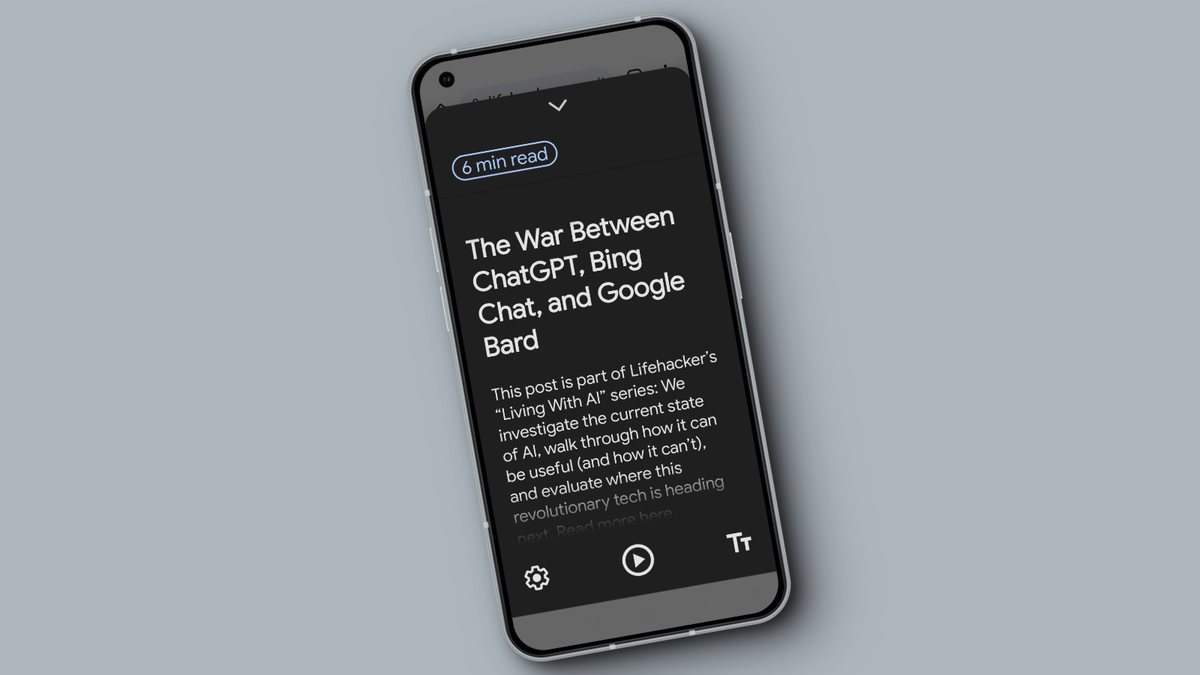
Google Chrome for Android is rolling out a redesigned Reading mode that is easier to activate and offers customizable options like font, text size, and background color, with a more consistent and user-friendly interface, though it is not yet widely available.

The 32°N Sunglasses by Deep Optics offer an innovative solution for presbyopia, with the ability to transform into reader-strength bifocals with a swipe of a finger, but at a steep price of $849. While the sunglasses boast intuitive operation, easy calibration, and a stylish design, they have a smaller field of view than regular readers and do not provide the same level of clarity. Despite their potential, the first-gen 32°N Sunglasses may not justify the high cost, leaving room for improvement in future iterations.
Google has introduced a reading mode for Android that can be accessed in any app, allowing users to read articles without distractions. The reading mode app, designed for users with low vision, blindness, or dyslexia, can be customized for font size, color, voice, and narration speed. Users can trigger the reading mode through a floating virtual accessibility button, a two-finger swipe gesture, or by holding both volume buttons. This feature brings Android up to par with iOS, which has had a similar reading mode called "Reader View" in Safari.
Google has released Chrome 112, which includes security improvements, bug fixes, and new APIs for developers. The update also introduces support for nesting CSS style rules inside other rules. Google is preparing a redesign for Chrome inspired by the Material You design language and a new "Reading Mode" is available as an experiment. Users should accept the update as soon as it appears to ensure critical security fixes are installed.
Google Chrome has finally released a proper "Reading Mode" for its users, which removes images and unnecessary background elements from a webpage, making it easier to read. The new Reading Mode is resizable and customizable, allowing users to change the typeface, font, spacing, text, and background color. This feature is available to all users and is an all-new reading mode on the side panel, giving users a view of the original content and a stripped-down view.
Google is introducing a Reading Mode to ChromeOS and the Chrome desktop browser, which reduces distracting elements on the screen to help users focus on a page's primary content. The feature is accessed from the browser's side panel and offers several fonts, text size adjustments, and background color options. Additionally, Google is updating its Screencast app to support new languages, animated clicks/taps, and a new web player for easy sharing. Cast Moderator will also receive updates, including the ability to pause the screen and switch tabs without ending the cast session.